Accessing Bids
BidTracker (pre-deadline)
The BidTracker page makes it possible to see a list of submissions that have been made (including drafts) for a TenderBox that has not yet reached its submission deadline.
Click "BidTracker (before deadline)" in the Tender Submissions sub-menu in your user menu.

You will be presented with a list of TenderBoxes which you have access to and have not reached their submission deadline.
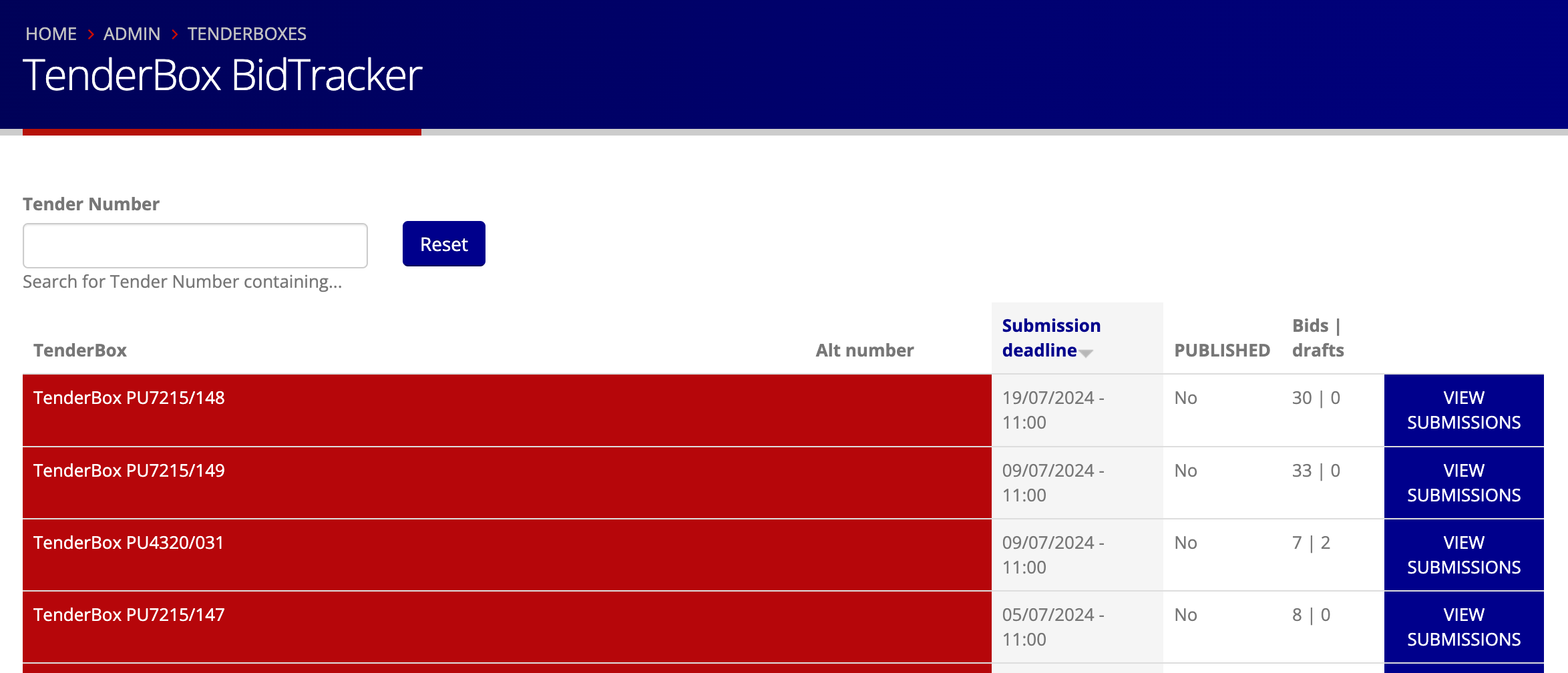
When there are existing submissions or drafts for a particular TenderBox, the "VIEW SUBMISSIONS" link will be available in the right hand column. Click this to see the list of submissions.
The table presented contains the following columns for each submission:
- Serial No: The index of the submission for this TenderBox
- Name: The name of the user who has made the submission
- E-mail: The email address of the user who has made the submission
- Phone: The phone number of the user who has made the submission
- Supplier: The name of the submitting organisation
- Submitted: The date at which the submission was made ("DRAFT" will be shown for submissions still in draft status)
BidSubmissions (post-deadline)
-
Click "BidSubmissions (after deadline)" in the Tender Submissions sub-menu in your user menu.

-
You will see a table of all TenderBoxes which you have access to that have passed their submission deadline. Contact your PURCO SA contract manager to get access to a TenderBox if it is not listed.

-
If helpful, use the search box to filter the list based on tender number or name.

See Viewing & Assessing Bid Submissions or Downloading Submitted Files and Data for more information on the links provided in the right hand column.